
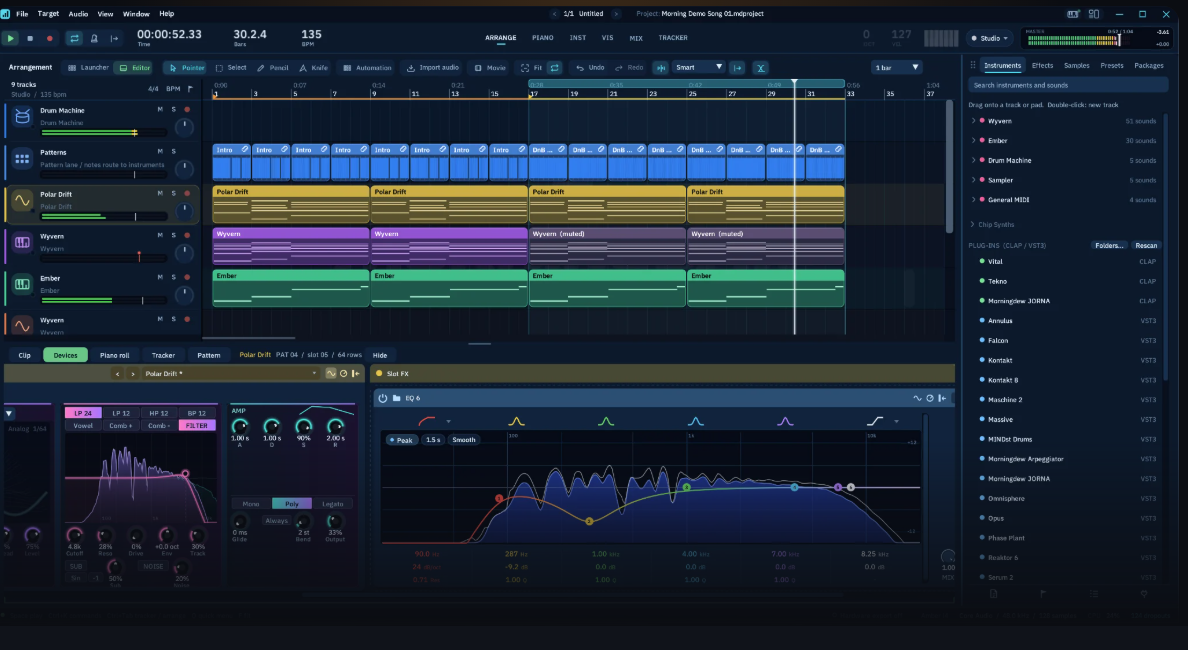

MorningDAW Review: A Serious New Contender for Electronic Music Producers?
An intriguing new DAW that promises to get out of the way and let you make music — without asking for your credit card details.
There’s something refreshing about a new DAW arriving without a hefty price tag, a subscription model or a dozen different editions designed to persuade you to spend more money. Meet MorningDAW, the latest offering from Morningdew Media, which has set out to build a modern music production environment that’s accessible to newcomers but powerful enough for more experienced producers.
And here's the thing: it isn't just another basic beat-making app. With a proper arrangement timeline, clip launching, tracker programming, built-in synthesis, sampling, audio editing and mixing facilities, MorningDAW looks like it wants to cover pretty much the entire creative process. Best of all, it's free to download for Windows and macOS. No trial period, no feature-limited starter edition and no licence key to worry about.
For those of us who spend more time making music than worrying about software budgets, that's a pretty attractive starting point.
First impressions: workflow over window dressing
MorningDAW's big selling point is its approach to workflow. Rather than burying everything in nested menus, it uses radial, or pie, menus that put editing commands close to the mouse cursor. There's also a searchable command palette for finding actions when your memory inevitably fails you.
The idea is simple: spend less time navigating the software and more time getting ideas down.
That should appeal to electronic music producers in particular. When you're building a track around a sequenced bassline, a slowly evolving pad and a pile of rhythmic glitches, momentum matters. The last thing you want is to interrupt a creative session because you can't remember which submenu contains the function you're after.
The interface also brings several different ways of working into one project. You can arrange clips on a conventional timeline, trigger patterns and scenes in a clip launcher, program rhythms in a step sequencer or get stuck into the tracker view. Everything relates to the same underlying song, so you're not constantly bouncing material between separate environments.
It's an interesting approach, especially if your production style moves between conventional arrangement and more experimental, pattern-based composition.
Synths, samples and sound design
For electronic musicians, the built-in instruments are where things get interesting.
MorningDAW includes Wyvern, a wavetable synthesizer aimed at modern, evolving sounds, and Ember, a more traditional virtual-analogue instrument. Wyvern offers wavetable morphing, unison voices, filter options and a modulation matrix, while Ember provides three oscillators, noise, filtering and a more straightforward subtractive synthesis workflow.
These aren't just token instruments included to tick a box. The combination gives you a useful starting point for basses, leads, pads, drones and the sort of layered textures that can make an electronic track feel distinctive.
There's also an FM synth, a sampler, a multisampler and a 128-pad drum machine. Add the built-in effects — including convolution reverb, delays, phasing, frequency shifting, saturation, bitcrushing, EQ and dynamics processing — and there's a reasonable amount of sound-shaping potential before you've installed a single third-party plugin.
The modulation facilities are particularly promising. LFOs, envelopes, macros and other modulation sources can be routed to instrument and effect parameters, opening up possibilities for evolving textures, rhythmic filter movement and sound design that develops over the course of a track.
If, like me, you're interested in creating sounds rather than simply browsing presets, that flexibility is worth paying attention to.
Of course, the existence of a wavetable synth doesn't automatically make it a competitor to every specialist soft synth on the market. The real question is how the oscillators sound, how smoothly the modulation behaves and whether the instruments inspire you to make something interesting. Those are things that need proper listening tests rather than a checklist of specifications.
How does it compare with REAPER?
This is probably the most interesting comparison for anyone who values flexibility and getting plenty of functionality for relatively little money.
REAPER is an established heavyweight when it comes to customisation, routing, audio editing and efficient use of system resources and it has been my go-to DAW for a long time (since about 2010).. Its extensive scripting and configuration options allow you to build a workflow around almost any production task. It's also remarkably affordable for a fully featured DAW.
MorningDAW takes a rather different approach. Instead of asking you to configure your ideal production environment from the ground up, it arrives with a more integrated collection of instruments, effects and music-making tools.
Its piano roll, scale-locking facilities, chord and melody generators, step sequencer and clip launcher are clearly designed to make composition feel immediate. REAPER can be configured to handle a huge range of MIDI and electronic music workflows, but MorningDAW appears more focused on providing those creative facilities as part of a coherent, ready-to-use environment.
The trade-off is customisation versus integration. REAPER offers extraordinary flexibility, while MorningDAW's appeal lies in having a more deliberately designed electronic production toolkit available from the outset.
If you're already deeply invested in REAPER, with custom actions, scripts, templates and favourite plugins, there's little reason to abandon it simply because a new DAW has appeared. But if you want a second environment for sketching ideas, experimenting with patterns or building tracks without configuring half your studio first, MorningDAW looks worth exploring.
And what about Cubase?
Cubase occupies a slightly different position. It's a mature production environment with sophisticated MIDI editing, extensive recording and mixing facilities, advanced composition tools and a substantial ecosystem of instruments and effects. Its higher-end editions also offer features aimed at demanding professional production and post-production work. <Cite refs={["turn306554search0","turn306554search2"]}/>
MorningDAW's approach is more stripped back in spirit, although its feature set is becoming increasingly ambitious. It combines arrangement, clip launching, tracker programming, synthesis and audio editing without trying to reproduce every aspect of a large, established studio platform.
There are some particularly interesting areas of overlap. MorningDAW supports expression maps and can import DAWproject sessions from supported applications, including Cubase. That's a useful step towards interoperability rather than forcing producers to treat their DAW choice as a lifelong commitment.
However, project import shouldn't be confused with perfect compatibility. Plugin availability, routing, automation and application-specific features can affect how faithfully a project transfers.
For electronic music production, I'd look at MorningDAW as a potentially more immediate, self-contained creative environment, while Cubase remains an attractive option for producers who need its established MIDI, recording, scoring and mixing workflows.
The important distinction is that MorningDAW doesn't need to replace everything Cubase can do to be useful. It needs to offer a workflow that makes you want to open it and start making music.
The tracker angle is a welcome surprise
One feature that deserves special attention is MorningDAW's tracker functionality.
Tracker-based composition has a long history in electronic music, particularly in chiptune, game audio and experimental production. Its grid-based approach to notes, effects and sequencing can encourage a very different way of thinking about rhythm and musical structure.
MorningDAW goes beyond simply offering a tracker-inspired interface. It includes instruments modelled on classic sound-chip architectures, support for tracker formats and export options associated with retro hardware.
That's a niche feature, certainly, but a welcome one. It gives the software a character of its own rather than making it feel like a generic DAW assembled from familiar features.
Even if you're producing darkwave, synthwave, industrial electronica or ambient music rather than chiptune, there's creative value in having different ways to approach a musical idea. Sometimes a different interface is enough to get you out of a rut.
Mixing and mastering: enough to get started?
MorningDAW includes a mixer with track inserts, group tracks, sends to effects tracks, automation and a selection of built-in processors. There's also loudness and true-peak metering, alongside a maximiser for adding density and level to a mix.
For a producer working independently, that's a useful foundation. You can build a track, organise your channels, create effects returns, automate parameters and prepare a mix for export without immediately needing to assemble an external collection of utilities.
Third-party plugin support is another important consideration. MorningDAW supports CLAP and VST3 instruments and effects, with Audio Units available on macOS. That means you aren't restricted to its built-in devices if you already own favourite synthesizers, reverbs or mastering tools.
Still, having a complete set of mixing tools isn't the same as having a mature professional mixing environment. Stability in large sessions, plugin compatibility, latency handling and the usability of automation all matter when you're working on a complicated production.
Those are areas where hands-on testing will tell us considerably more than a feature list. I'd want to spend time with a demanding session, automate a few synth-heavy arrangements, run external plugins and see how the software behaves when things get complicated.
The big question: why is it free?
This is the part that makes MorningDAW particularly difficult to ignore.
REAPER is already known for offering a lot of capability for a modest licence fee, while Cubase is a commercial product with several editions and pricing tiers. MorningDAW's current offering is more straightforward: the core DAW is free, with no trial clock or locked feature tier.
For newcomers, that removes a substantial barrier to entry. For experienced producers, it makes experimentation almost irresistible.
Free software still has costs, of course. Long-term development, support, compatibility updates and the sustainability of the business behind a product all matter. It's worth keeping an eye on the developer's plans and any optional paid products or services rather than assuming today's pricing guarantees every future offering will follow the same model.
Even so, the proposition is compelling. You can explore an entirely new production environment without having to justify another purchase to yourself.
Verdict: one to watch
MorningDAW looks like an ambitious attempt to combine the accessibility of a modern electronic music workstation with the flexibility expected of a serious DAW.
Its strongest selling points are the integrated instruments and effects, multiple composition workflows, modulation facilities, tracker support and a design intended to keep useful actions close at hand. The ability to use third-party plugins and import supported DAWproject sessions also gives it a more practical role alongside existing production setups.
Compared with REAPER, it looks more integrated and composition-focused out of the box. Compared with Cubase, it offers a leaner alternative with an unusually broad set of creative tools for something that costs nothing to get started with.
There are caveats. I wouldn't recommend switching your entire studio over without testing it against your existing workflow, and the real quality of its instruments, performance and long-term reliability needs to be judged through actual use. Feature parity on paper doesn't necessarily translate into the same depth of experience.
But here's the bottom line: MorningDAW is worth downloading if you're an electronic music producer looking for a fresh way to work. Whether you're sketching synthwave ideas, building industrial rhythms, experimenting with ambient textures or programming tracker-style sequences, there's enough here to make it a genuinely interesting addition to the software landscape.
It doesn't have to kill REAPER or dethrone Cubase. It just has to give you another reason to make music.
And for a free DAW, that's a pretty good start.
MorningDAW is available for Windows and macOS from Morningdew Media: https://edu.morningdewmedia.com/